

Products & services · Bench Tools · FormSense · Test a form
Test a form. Bring the one slowing your lab down the most.
FormSense comes from the team whose software runs in production for clients including UW Veterinary Care, Maine DOT, and NIEHS. Your first step is a thirty-minute session with an expert and your filled forms.
FormSense reads the printed and handwritten fields on a filled form and turns them into a record your team checks and approves before anything reaches your LIMS. Pick the form that slows your laboratory down the most and bring your filled examples, with patient and client details removed or made up. In thirty minutes with an expert, we run them through FormSense together and review every field it reads. FormSense is available now.
Talk with an expert How to bring it →
In a thirty-minute session with an expert, you watch FormSense extract your forms. Bring PDFs or scans of the forms you want to see.
01The form
Bring the forms that slow you down.
Want to see your pages extracted live? Bring the forms you think will be the most difficult to read, and we will run them through FormSense with you. Then you can judge for yourself how much typing it would take off your team.
- A submission sheetthe form your clients send with the samples
- An accession worksheetthe sheet the front desk or the bench fills in as samples are logged
- A result loga bench log or plate sheet where results are written down before anyone types them
Filled examples show the most. Bring a few messy ones, with crossed-out values, ditto marks, and dates written over.
02How to bring it
Three steps, with no upload.
1
Pick the forms
Choose the ones that slow your laboratory down the most, in the hand they often arrive in.
2
Book a session
Book thirty minutes with an expert, on your calendar, and bring PDFs or scans of filled examples.
3
Review it together
We run your pages through FormSense live and go through what it read with you, field by field.
Email your examplesUse the subject “Test a form”. We will set FormSense up for your form before we meet.
Before you send or bring a page, remove or make up any patient, owner, or client details.
03What you will see
What you will see in the session.
FormSense reads each page and puts it in front of a reviewer. For every field you see what was read, the final value, a confidence score, how the value was derived, and any change a person made. Fields with low confidence are flagged for a person to check. Nothing reaches your LIMS until someone approves it.
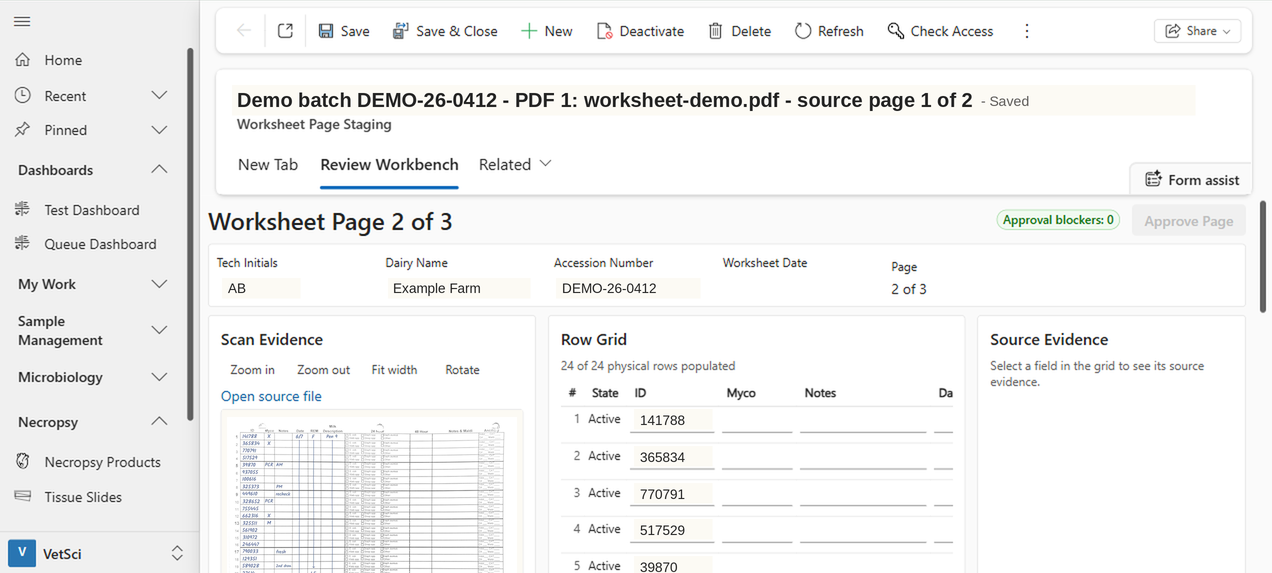
Approved pages become records in your LIMS through an adapter configured for that system. Export to PDF or spreadsheet is also available. If you need the data somewhere else as well, ask us.
04After the session
Putting it to work.
If FormSense reads your forms well, you can start using it. Talk with an expert. The product is on the FormSense page.