

Products & services · Bench Tools
FormSense, for any laboratory where paper still arrives
FormSense comes from the team whose software runs in production for clients including UW Veterinary Care, Maine DOT, and NIEHS. Your first step is a thirty-minute conversation with an expert.
FormSense reads the paper and handwritten forms your laboratory already receives and, once a person approves each field, sends them into your LIMS as records. Your team spends less time typing forms in and more time at the bench doing science.
Less re-keying. More science.


THEN · 1947 · Smithsonian Institution Archives · NOW · digitally rendered
THEN · 1947 · Smithsonian Institution Archives (Science Service) via Wikimedia Commons · public domain · Commons file: Barbara McClintock (1902-1992) shown in her laboratory in 1947 NOW · digitally rendered from the archive photograph above (Gemini 3 Pro Image, 2026-09-26): the room geometry, the camera and the people's positions are the photograph; everything else is generated. Not a photograph.Opens your print dialog. Choose Save as PDF.
01Who this is for
Laboratories where paper still arrives at the desk
Not every laboratory will ever be fully digital. Submission forms, worksheets, and bench logs still arrive on paper, and someone has to type them in again. FormSense reads those pages for you and takes the re-typing off your team.
FormSense is a Bench Tool. It works with the LIMS you already run, so trying it is not a platform decision.
Not for Laboratories whose intake is already electronic from end to end. What it does not do →
02The problem
Where the record goes missing
My worksheets don’t make it into the record.
Intake is where the record first drifts away from the sample. A worksheet typed in from memory at four o’clock is a record nobody can audit.
- The day’s worksheets are re-keyed into the LIMS at the end of the shift, by the person you can least spare.
- A bench keeps a paper log because the instrument is nowhere near a keyboard, and the log is right until someone copies it.
- A reviewer signs results whose intake step left no trail.
03How we help
Three steps from paper to a reviewed record

from submission sheets to bench logs
Submit
Scan or photograph the page.
Extract
Printed and handwritten fields alike, every field a confidence score.
Review
A reviewer sees the page and the fields side by side, and approves.
Nothing reaches the LIMS unreviewed.
1890–1905, Wikimedia Commons, public domain
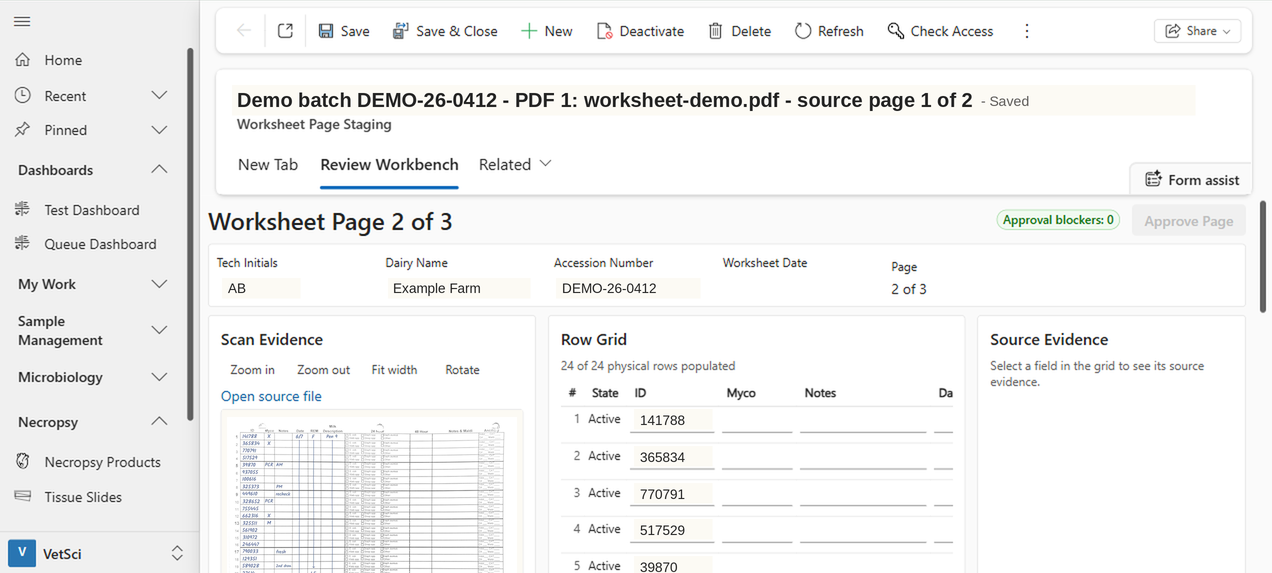
FormSense Review Workbench - scan, row grid and source evidence side by side before anything commits. Identifiers replaced; data synthetic.
The Review Workbench
For every field, the workbench shows the raw value read from the sheet, the final value, a confidence score, how the value was derived, and any manual override. Fields with low confidence are flagged for a person to check.
One sheet, seven records
One approved log sheet became the request items your LIMS expects. Each one traces back to the page and the reviewer.
It works with the LIMS you run
FormSense does not need our LIMS. It delivers approved records through an adapter configured for the system you already run, and we scope that adapter with you. On LabSci, reviewed records become ordered request items on the same platform. Export to PDF or spreadsheet is also available.
Leadership
If you run the laboratory
Trying FormSense is a small decision. It changes intake and leaves your LIMS strategy alone. You pay by the page. Nothing moves to production until you decide.
Bench
If you work the bench
The worksheet stays. You scan or photograph the page and drop it in the queue, and the Review Workbench shows the page and its fields side by side. What you approve is what the record says. Nobody retypes the day’s sheets at four o’clock, and the person who used to do it reviews the exceptions instead.
QA
If you review and sign
Every field keeps its raw value, final value, confidence score, derivation, and any override, and a named reviewer approves it. The transcription step you could not audit becomes a record you can. Approved pages are staged before they are saved, so the record shows what reached the LIMS and who allowed it.
IT
If you administer the tenant
FormSense runs in your own Microsoft tenant or hosted by SynapticSci. Microsoft’s document-reading service in Azure reads the pages, and reviewed records land in Dataverse staging tables before they become ordered request items. Reviewers sign in with Entra ID. Use is metered by FormSense Credit, one credit per page when it reaches review, and named users are unlimited. Platform certifications are Microsoft’s, and we cite them as Microsoft’s.
Want to see it on your own forms first? Test a form → Ready to start? Talk with an expert →
04Platform
Where your pages live
Reviewed pages become Dataverse records on the platform beneath LabSci. If your LIMS is another vendor’s, the adapter carries the approved records across.
FormSense runs in your own Microsoft tenant, where your laboratory’s data already lives, or SynapticSci hosts it for you.
Hosted
Hosted by SynapticSci
Hosting is the fastest way to put your own forms through the Review Workbench.
Your tenant
Your own Microsoft tenant
FormSense is deployed in your laboratory’s own Microsoft environment, and in the standard deployment the data does not leave your tenant. Where your data lives →
05Evidence
What we can show
We have run FormSense on real laboratory log sheets. The screenshot and the fan shown here come from that work, with every identifier replaced. We show measured read rates, review times, and exception counts when we meet. Ask to see them →
FormSense on real laboratory log sheets, on the Evidence page



06What it does not do
What FormSense does not do
- It does not approve a page by itself. A person approves every page.
- It does not promise an accuracy figure.
- It reads only the forms it has been set up for.
- It does not contact the practices named on the forms your laboratory receives. Your submitters stay yours.
- It does not certify a regulated process. It gives your validation the audit trail it needs.
- It is a Bench Tool that feeds the LIMS you run, and it does not replace that LIMS.
07Pricing
Metered by the page
Use is metered by FormSense Credits, one for each page that reaches review, with tiers sized to your monthly volume. Ask for the figures →
Retries, corrections, and delivery use nothing more, and named users are unlimited. Guided onboarding, dedicated deployment, and premium support are priced separately. The full price list is on the pricing page.
08Where it fits
Where FormSense fits
On our practice and problem pages
See how FormSense fits the work described on these pages.
Practice pages
Problem pages
- The same information is typed in twice.
- Systems do not share the information people need.
- It’s hard to reconstruct what happened to a record.
- The software does not fit how the laboratory works.
- We type submission forms in again at accessioning.
- We type field records in again when specimens reach the laboratory.